| Unit 3 - The Elements of Music | Notes and Staff | Scales and Key Signatures | Rhythms | Composing Music You are here |
Assignments |
Composing Music
|
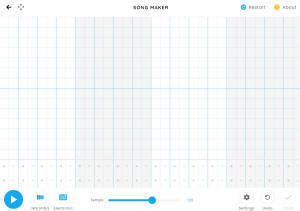
Now that you know a little about the mechanics of music (notes, rhythm, scales, etc.) let's see if we can put these all together to compose an original melody. Although there are rules to follow when you write music, our goal in this lesson is to create a melody that is pleasing to you. First, click on 'Google music maker' (to the right) to start experimenting with pitches. Click on the boxes to select pitches. Notice that the higher the box you click, the higher the pitch. Play around with this app and compose a few easy melodies. |

Second, Create a a melody to turn in. This time, I want you to compose 1 melody that you think is pleasing to the ear. We are going to 'save' this melody and turn it in as a part of your assignment.
Here are the steps (watch the video below)
In YouTube
Open the 'Google music maker" in full screen.
Create a 2 measure pleasing melody.
Once you have a nice melody composed, 'save' your melody:
Save your melody by clicking on the Save button in the bottom right corner
There are two choices for this assignment: Musician and Non-musician. If you have limited experience with music you should probably choose the Non-musician option. If you can read music, then I challenge you to the Musician option.
|
Assignment #4 Choose One of these 2 options: |
|
|
Non-Musician Option Go to the 'Google music maker" Compose a song. Copy the link and paste it into the "Putting it together" assignment in Canvas. |
Musician Option
Your melody needs to be
When you have finished composing your song, you will need to copy the URL and paste it into the putting it together assignment in Canvas |